Setup your PayPal Business Account correctly
Step #1: Login to your PayPal Business Account
Step #2: Go to "Account settings"
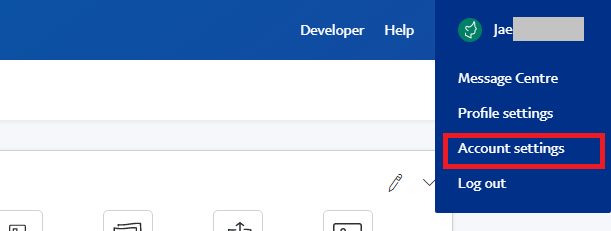
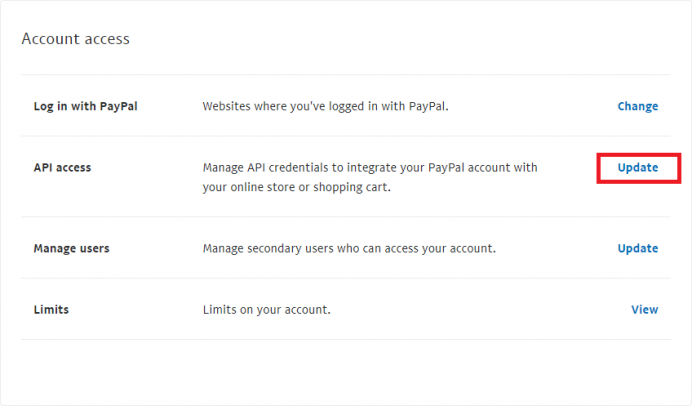
Step #3: Go to "Account Settings" > ACCOUNT & SECURITY > Account access
Click "Update" link of "API access" as follows.
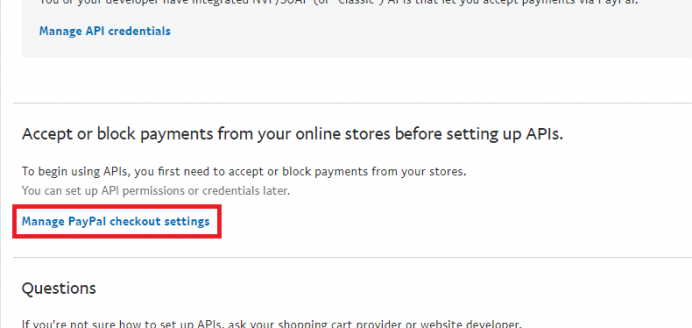
Step #4: Click "Manage PayPal checkout settings" as follows.
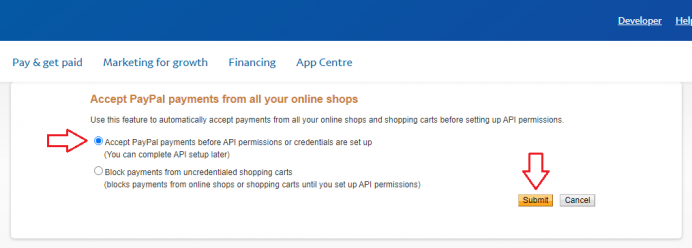
Step #5: Choose "Accept PayPal payments before API permissions or credentials are set up
(You can complete API setup later)" and click [Submit] button as follow.
Step #6: Notify your system administrator that the setup is complete.
- END -
Regards
MembershipManager.com.au
| CATEGORY | TITLE | DATE | VIEWS |
|---|---|---|---|
| SYSTEM UPGRADE | How to embed PDF Viewer into your website content | 01/07/2024 | 10350 |
| SYSTEM UPGRADE | Training Schedule Management System released !!! | 21/09/2023 | 6337 |
| SYSTEM UPGRADE | Back button added to the checkout/confirmation page | 29/06/2022 | 6979 |
| CUSTOMISATION | [HOW TO] Close and resume membership registration | 12/02/2022 | 5967 |
| HOW TO | Setup email footer | 26/01/2022 | 6622 |
| HOW TO | See at a glance who has a note on the registration | 04/10/2021 | 6160 |
| HOW TO | Multiple selection for team/email group when sending e-Newsletter | 04/10/2021 | 6243 |
| SYSTEM UPGRADE | [HOW TO] Create a Payment Plan | 26/06/2021 | 7334 |
| CUSTOMISATION | Registration Form Validation - FairPlay voucher | 18/06/2021 | 6783 |
| HOW TO | Bulk Update Team Assignment | 16/06/2021 | 7939 |